Google Scholar API
Give your research agent structured academic search results. Discover papers by topic and year, follow citing articles and find publication versions—with source links for review.
Discover papers · Follow citations · Find versions
Advanced search parameters
https://api.goanyapi.com/api/v1/google-scholarRun a request to see the visual result
The response is organized into metrics, lists and tables that match the JSON on the right.
Run a request to see the response here
Sign in and run a test to view the actual response. Nonempty successful results use the credit rate shown above.
Match the source page to the response
This public machine learning search illustrates the publication cards behind these field meanings. Open Google Scholar
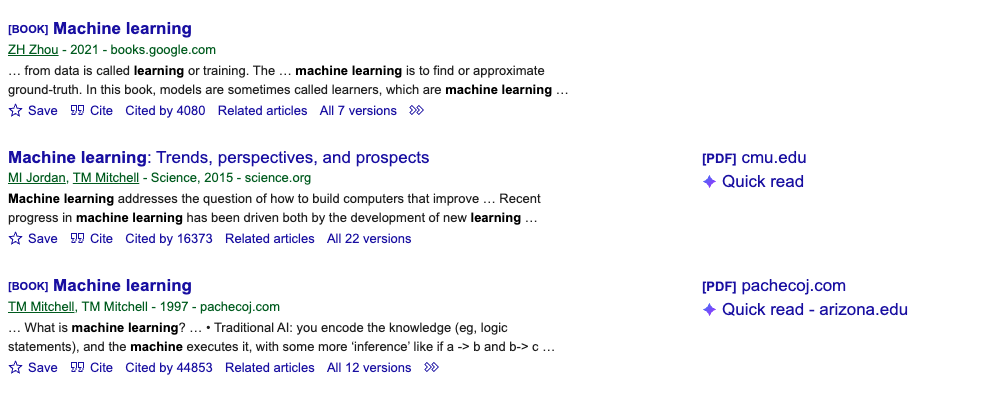
Visible elements → JSON fields
- Blue publication title
data.result.content.results[].title / data.result.content.results[].urlThe publication title and destination link; books also appear.
- Publication line below title
data.result.content.results[].publication_infoThe visible author, year and source information.
- Search excerpt
data.result.content.results[].snippetA search-result excerpt, usually not a full abstract.
- Cited by link
data.result.content.results[].cited_by / data.result.content.results[].cited_by_urlVisible citation information and a link carrying the cites parameter.
- All … versions link
data.result.content.results[].versions / data.result.content.results[].versions_urlVisible version information and a link carrying the cluster parameter.
Ordering, citation counts and version counts can change with time, language and query. cites and cluster IDs are parsed from links, not directly displayed. The visible Cite, Save and Quick read controls do not imply API support for those actions.
Give your research agent a verifiable reading list
Retrieve search results, then let your agent organize the evidence. These are task examples: the tool is not yet listed in the production Catalog, so check your tool list before running them.
Build a literature shortlist
Scope an initial reading list on a research question, such as evaluating retrieval-augmented generation. Keep search evidence separate from conclusions that require reading the papers.
Use the GoAnyAPI Google Scholar tool to search for retrieval augmented generation evaluation with as_ylo=2024, as_yhi=2026, page=1 and num=10. Retrieve only this page; do not paginate automatically. Build a shortlist using the returned title, url, publication_info and snippet. Explain relevance to the question, preserve source links and search settings, and mark missing fields. Treat snippets as search excerpts, not full abstracts or proof that a paper was read. Stop if the tool is unavailable.Search evidence for literature discovery workflows
The API retrieves records. Your agent organizes them around a research question and keeps the original links available for review.
Scope a focused reading list
Combine topic searches, publication-year bounds and review-article filters to select papers for closer reading.
Trace follow-up research
Use returned citation links to explore papers that cite a publication, with explicit limits on pages and scope.
Prepare sources for your knowledge base
Pass titles, publication information and source links into your own pipeline. Full-text retrieval and indexing are separate steps.
Turn search records into reviewable evidence
Use these request and field notes to check agent output. The Tester above contains a saved machine learning response, not a new run or current citation counts.
GET https://api.goanyapi.com/api/v1/google-scholar?query=retrieval+augmented+generation+evaluation&as_ylo=2024&as_yhi=2026&page=1&num=10
Authorization: Bearer YOUR_API_KEY
Request syntax only, not a measured result. Adjust years for your question; page and start are mutually exclusive.
Key JSON paths
data.result.content.results[].title- Publication title, sometimes with book or document markers. Not every result is a journal article.
data.result.content.results[].publication_info- Publication information may be text or structured data. Use only author and year details actually returned.
data.result.content.results[].snippet- A search excerpt that may be truncated or absent, not a guaranteed full abstract.
data.result.content.results[].cited_by_url- Link to citing articles. Extract its cites parameter, not results[].id.
data.result.content.results[].versions_url- Link to alternate versions. Extract cluster; omit query and cites in that request.
data.result.content.has_next_page- Pagination state when present. Do not infer complete coverage or total counts when absent.
Google Scholar API FAQ
Follow the GoAnyAPI MCP guide in a compatible client, authorize your account and check for goanyapi_google_scholar in the tool list. The current production Catalog does not list this tool yet, so a successful MCP connection alone does not establish availability. Use the task examples once it is available; HTTP integration details are in the Docs.
It returns search records for discovery. An agent can organize a shortlist, but snippets are search excerpts and may be incomplete. A literature review still requires reading sources, checking methods and documenting search coverage; one page is not an exhaustive review.
A cites request finds papers that cite a selected publication. It does not export APA, MLA or BibTeX references. Author-profile details are also outside this endpoint.
Returned url or resource fields may link to PDFs or publication pages. A cluster request finds alternate versions, but this API does not download full text or guarantee free access to those links.
as_ylo and as_yhi set inclusive publication-year bounds. language changes the interface language; lr restricts result languages. scisbd defaults to 0 for relevance; 1 requests recent abstracts and 2 recent articles. See the Docs for combinations and limits.
Set a page budget first. Use one-based page or zero-based start, never both; num defaults to 10 and accepts 1–20. Each nonempty successful page, including citation and version requests, uses the current rate. Empty results, invalid requests and failures are not charged. See the Tester or Docs for current pricing.
An external client or workflow can repeat scoped searches, store records and send notifications. Scheduling, deduplication, persistent storage and alerts are not built into this endpoint.
Continue your research
Choose another signal for your research, then compare the results in context.