TikTok CapCut Trending Templates API
Find available historical hours, read templates from a selected snapshot, or browse the current CapCut Most Used listing. Test all three queries below.
Available hours · Historical templates · Current templates
https://api.goanyapi.com/api/v1/capcut-most-used/realtime?page=0- Page
- 0
- Count
- 24
- Next Page
- 1
Items
12 / 24| Template Id | Template Url | Title | Slug | Cover Url | Preview Video Url | Use Count Text | Use Count Estimate | Source Url | Source Category | |
|---|---|---|---|---|---|---|---|---|---|---|
 | 7493918549925203253 | LF | trending-foryouシ-go-viral | 2.2M | 2.2M | most-used | ||||
 | 7576228420338699521 | Paro | paro | 1.2M | 1.2M | most-used | ||||
 | 7582856536771300613 | Tere jujbato me | Instagram-Trending-Template-newviraltemplate-viral | 1.1M | 1.1M | most-used | ||||
 | 7479665271486123325 | PELIGROSA | peligrosa-kevin-editz-fyp-slowmo-clipvideo | 751.2K | 751.2K | most-used | ||||
 | 7573721589477297425 | Rag Rag woh | romanfx-new-template-viral | 678.9K | 678.9K | most-used | ||||
 | 7567912685145197877 | VELOCITY x COLOR AD | tiktok-foryou-trending-velocity-slowmotion | 517.8K | 517.8K | most-used | ||||
 | 7574395599290633525 | Airplane Mode On | tiktok-foryou-trending | 481K | 481K | most-used | ||||
 | 7360345383802834184 | use headphone | velocity-slomotion-viral-trending | 272.9K | 272.9K | most-used | ||||
 | 7485823454126624053 | Ino reverse fr | jjk-yuji-sukuna-jujutsukaisen-fyp | 260.9K | 260.9K | most-used | ||||
 | 7498581353139539253 | Kahan Se Yeah Haowa | foryou-Hindi-love-song-trending-viral-romantic-gan | 223.4K | 223.4K | most-used | ||||
 | 7544763435276406069 | new trending | new-trending-template-capcuttemple | 220.4K | 220.4K | most-used | ||||
 | 7505252255323426101 | BABY REMIX | fyp-trend-makeitviral-babyremix-smoothslowmo | 154.3K | 154.3K | most-used |
Match the website cards to API fields
The screenshot shows the public CapCut Most Used page. The field guide maps what you see on a card to the template list JSON. View the CapCut Most Used page
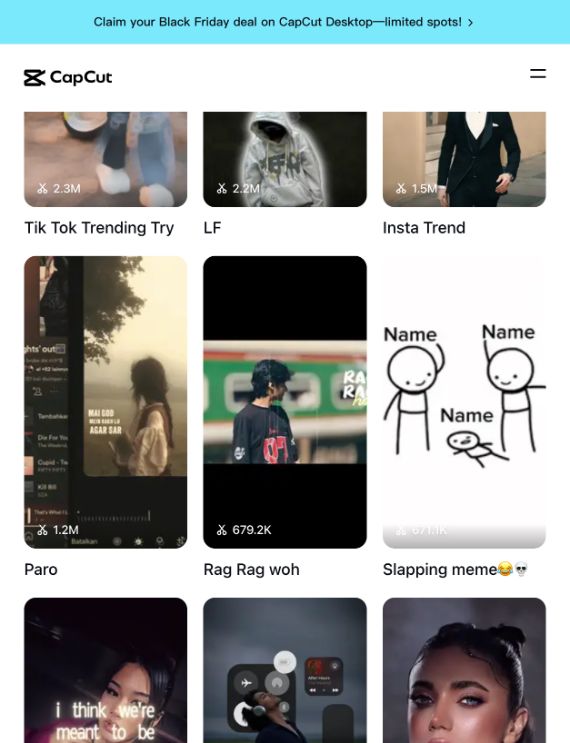
Website elements and response fields
- Card cover image
items[].coverUrlDisplay the cover; the link may expire.
- Template title below the cover
items[].titleFor example, “Tik Tok Trending Try” in the screenshot; titles can be empty.
- Usage label on the cover, such as 2.3M
items[].useCountText, items[].useCountEstimateThe first retains the displayed text; the second is an approximate number for sorting, not an exact count.
- Click a card to open its template
items[].templateUrl, items[].templateId, items[].slugThe link opens the template. The ID and URL slug come from the link; they are not printed on the card.
- Card order in the listing
items[].pagePosition, items[].positionHistorical templates only. Positions follow card order; the site does not print rank numbers on cards.
A static screenshot cannot show the cover's hover preview; previewVideoUrl is the preview video link. pagePosition, position and collectedAt appear only in historical template snapshots and describe the page position, snapshot position and collection time. The hours in the available times list are queryable snapshots, not text on the original cards. Cover and preview links can expire.
Three queries for template research
Start with the current listing, or choose a saved hour before reading historical templates.
1. List available historical hours
Enter day in YYYYMMDD format. The free, authenticated query returns data.times: available hours from 0 to 23 in Asia/Shanghai, or an empty array.
2. Read templates for an hour
Pass the same day and a returned time. Start at page 0, follow nextPage, and inspect template links, media, usage estimates and historical positions.
3. Read current templates
Query page 0 without a date or hour, then follow nextPage. Each request reads a current listing page; results can change between requests.
Compare template metadata
Keep template IDs as strings and usage counts as estimates. Repeated cards and listing order are preserved; page size varies.
Use template trends to find ideas for a new-word site
1. Collect candidate phrases
Read title, slug and templateUrl from current templates. Extract specific names, formats or themes; deduplicate by templateId and keep the source link. Check ambiguous short titles such as “LF” by hand.
2. Compare saved snapshots
List available hours for a day, then read those snapshots. Compare new entries and position changes by templateId, using useCountText as context.
3. Validate search intent
Check candidate phrases with GoAnyAPI Google Autocomplete, Google Trends and SERP APIs for suggestions, relative interest and search-result intent.
4. Publish and measure
Write tutorials, examples and FAQs for validated template names or formats. Link to the template detail, record the publication date, and track site impressions and clicks.
Frequently asked questions
This API returns the CapCut Most Used template listing for TikTok content research. It does not return TikTok videos, profiles or follower data.
Select Available hours and enter day (YYYYMMDD). Then select Historical templates, keep the same day, use one returned hour as time, and start with page=0. Snapshots are retained for 30 days; unavailable hours do not fall back to another snapshot.
Available hours requires day. Historical templates requires day and time, with optional page (0–19). Realtime templates accepts optional page only. The Tester shows the matching fields when you change modes.
page ranges from 0 to 19 and defaults to 0. Follow nextPage until null. Card order and repeated templates are preserved; count includes duplicates and page size varies.
Cover and preview video links can expire. Keep template IDs and metadata and handle unavailable media. This API does not generate or edit videos.
No fixed refresh interval is promised. A realtime request reads the current page, and the listing can change between calls. Use historical snapshots when you need a saved hour for comparison.
No. useCountText is the usage label on a template card, and useCountEstimate is only an approximate conversion. Neither is search volume. Validate new-word topics with autocomplete, trends and search results.
Available hours are free and require authentication. History and realtime have separately configured rates; only non-empty successful pages are charged. Empty lists and failures are free. Check creditsUsed for the actual deduction and Tester, Pricing and Docs for current rates.
Explore related GoAnyAPI APIs
Choose another signal for your research, then compare the results in context.