ChatGPT Plugin Directory API
Discover ChatGPT plugins by category or developer. Get plugin descriptions, versions, and public links from directory data updated every hour.
https://api.goanyapi.com/api/v1/chatgpt-plugin-directory/categoriesResult
16| Code | Name |
|---|---|
| featured | Popular |
| new-and-noteworthy | New & Noteworthy |
| small-business | Small Business |
| productivity | Productivity |
| creativity | Creativity |
| developer-tools | Developer Tools |
| business-and-operations | Business & Operations |
| data-and-analytics | Data & Analytics |
| communication | Communication |
| education-and-research | Education |
| scientific-research | Scientific Research |
| security | Security |
| finance | Finance |
| healthcare | Healthcare |
| travel | Travel |
| other | Other |
Google Drive: from plugin page to JSON
Match all 12 plugin fields to the detail page, link destinations and response metadata. View source
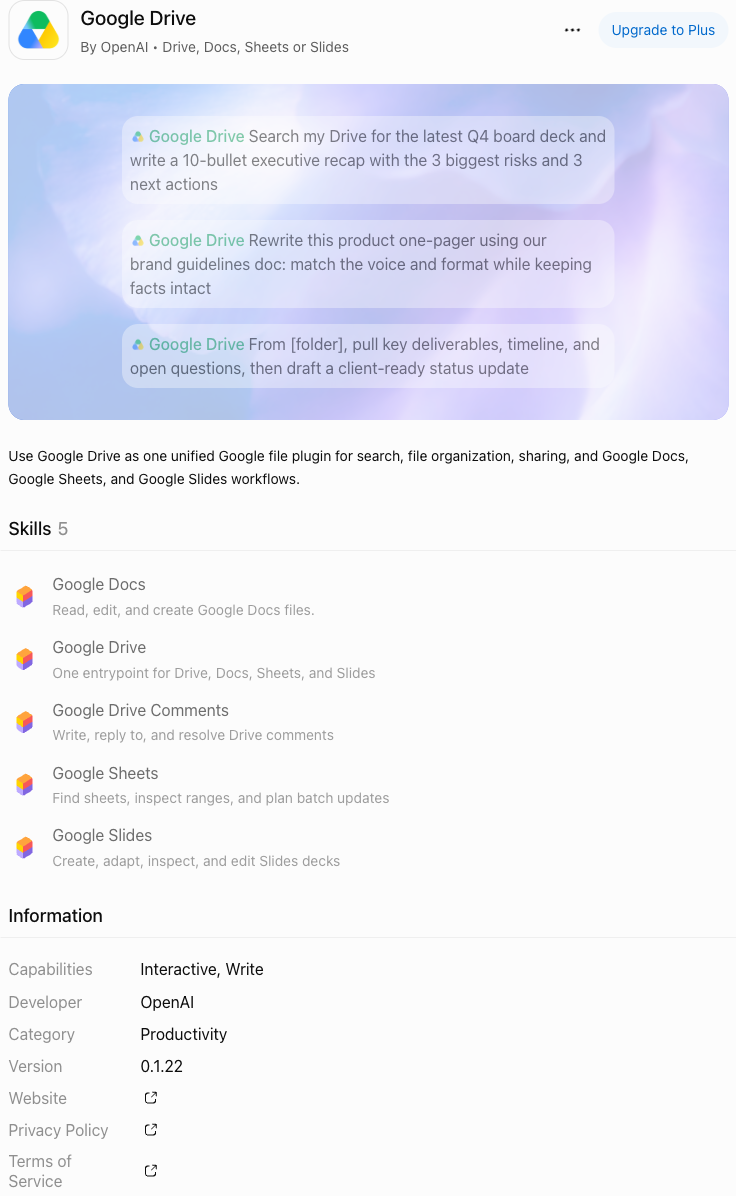
All 12 plugin fields
- Plugin name
data.result.list[].nameGoogle Drive, shown at the top of the detail page.
- Short description
data.result.list[].shortDescriptionThe subtitle after “By OpenAI”.
- Full description
data.result.list[].descriptionThe paragraph below the preview artwork. The current text differs from the saved example.
- Plugin icon
data.result.list[].iconUrlThe plugin icon’s image URL; the URL itself is not printed in the screenshot.
- Composer icon URL
data.result.list[].composerIconUrlAn additional response field, not a separate labeled element here. It matches iconUrl in this saved example.
- Developer
data.result.list[].developerOpenAI in the subtitle and Information section.
- Category
data.result.list[].categoryNameProductivity in Information. Requests use a category code from the categories endpoint.
- Version
data.result.list[].version0.1.22 in Information; this is not a release date.
- Website link
data.result.list[].websiteUrlThe destination of the Website link.
- Privacy Policy link
data.result.list[].privacyUrlThe destination of the Privacy Policy link.
- Terms of Service link
data.result.list[].termsUrlThe destination of the Terms of Service link.
- Detail page URL
data.result.list[].detailUrlThe address of this plugin page; open “View source” to inspect it.
Captured November 9, 2026; the saved API example is from November 5. Descriptions and versions can change. Skills, Capabilities and the preview artwork are visible here but are not fields in this API.
Pagination is separate from each plugin: data.result.page, size, total, totalPages and hasNext describe the API result page, not the plugin detail screenshot.
From plugin discovery to developer research
Directory data for evaluation and catalog workflows. Check the current plugin page for installation, availability and plan requirements.
Build a category shortlist
Read category codes first, then query one category. Retrieve up to 10 records per page and follow hasNext.
Review developers and public links
Get exact developer names, then inspect their plugins, versions, websites and policy links.
Feed your own catalog workflow
Store responses and compare changes in your system. Built-in history, ratings, installs and keyword search are not provided.
Give your agent a directory research task
Connect and authorize GoAnyAPI, confirm the required tools are listed, then run a bounded research task.
Build a bounded shortlist
Discover a category before selecting a small page budget.
Check that GoAnyAPI directory tools are listed; stop if unavailable. List categories and choose a returned productivity-related code. Retrieve at most the first 2 pages for that code. Summarize name, developer, description, version and detail link. Preserve missing values, state the sample scope and do not infer ratings or installability.Frequently asked questions
No. It returns directory categories, developers and plugin records. It does not install plugins or call their tools.
Read category codes before querying a category. For developer research, obtain the developer name from the developer list and preserve its exact spaces and case.
Those inputs are not provided. Filter a bounded sample in your own workflow and store snapshots if you need historical comparisons. A sample is not the complete directory.
A version, URL or description can be missing, null or empty without making the request fail. A directory listing does not establish installation availability for an account, plan or region.
Categories are free and require authentication. Other successful nonempty requests use the configured rate; every page and repeated request is billed separately. Empty results and failures are free. See the current Tester and pricing page.
First connect and authorize GoAnyAPI, then confirm the directory tools appear in your tool list. Saved response examples are free to view and are not live results.
Explore related GoAnyAPI APIs
Choose another signal for your research, then compare the results in context.